In case you want to locate tasks (that use standard business data) on the Task Engine to which the webMethods Integration Server is connected to, an invoke to built-in service "pub.task.taskclient:searchTasks" is used. On the other hand, when working with indexed business data fields service "pub.task.taskclient:searchTasksIndexed" is called.
From a past experience an invoke of service "pub.task.taskclient:searchTasks" resulted in a long running sql query on the related Database source. This eventually led to a "java.net.SocketTimeoutException: Read timed out" scenario between Integration Server and Task Engine. A result set of 140 active tasks took more than 90 seconds to get returned causing the Integration Server per default to disconnect the ongoing Task Engine query after 60 seconds.
One option is to put on the Integration Server extended setting "WSClientConfig.SocketTimeout" in place and increase the timeout value (in milliseconds).
A better, more elegant and formal solution is to replace invoke "pub.task.taskclient:searchTasks" by "pub.task.taskclient:searchTasksIndexed" and put boolean businessData to false. The replacement service will take advantage of the built-in index capabilities whereas "pub.task.taskclient:searchTasks" doesn't.
When using service "pub.task.taskclient:searchTasksIndexed" instead of "pub.task.taskclient:searchTasks" a similar result set was returned in a couple of seconds instead of causing an operational problem for the integration.
Author: Johan
Monday, February 18, 2013

Monday, February 4, 2013
Turn Machine Data into Real-time Visibility, Insight and Intelligence
Ever needed to analyze your system? To look what's going on? Always faced the insanaty of huge logs? Then I may have a working solution for you...and yes it is partly free and yes it is cloud based. The magical product is SplunkStorm from splunk.com.
Splunk Enterprise is the platform for machine data. It's the easy, fast and resilient way to collect, analyze and secure the massive streams of machine data generated by all your IT systems and technology infrastructure.


Press the File menu item :
 Upload a log file. I use the log file from an Oracle Service Bus installation running on top of Weblogic.

After pressing the upload button, the Splunk magic is started. Splunk starts parsing the log file, extracting the log based on the timestamps.

Go to the Project home, then press explore data.

Quickly, as soon as SplunkStorm has finished indexing your log files, you can drill down issue, follow what's going on, ...
Splunk also has a local installer which can be installed on the different platforms Linux, Mac, Windows, ... Should I have more time, I 'll drill further into the reporting capacities of this tool in future posts.
Splunkstorm.com
Doc: https://www.splunkstorm.com/storm/support
Tutorial : http://docs.splunk.com/Documentation/Storm/latest/User/WelcometotheStormtutorial
Author : A.Reper
What is SplunkStorm?
From the documentation - http://www.splunk.com/product :
Splunk Enterprise is the platform for machine data. It's the easy, fast and resilient way to collect, analyze and secure the massive streams of machine data generated by all your IT systems and technology infrastructure.
Troubleshoot problems and investigate security incidents in minutes (not hours or days). Monitor your end-to-end infrastructure to avoid service degradation or outages. Gain real-time visibility and critical insights into customer experience, transactions and behavior. Make your data accessible, usable and valuable to everyone.
How to get started?
- First create an account
- Next add your first project

- Choose the plan you wish to use, in this case I can live with the Free plan1Gb storage.

- SplunkStorm Main Dashboard

What's next?
Lets import our first logs file. For the purpose of this post I only use a file based log. Forwarders seems a great approach but this is too far for an introduction.Press the File menu item :


Viewing the data

Go to the Project home, then press explore data.

Quickly, as soon as SplunkStorm has finished indexing your log files, you can drill down issue, follow what's going on, ...
Not Cloud minded?
Splunk also has a local installer which can be installed on the different platforms Linux, Mac, Windows, ... Should I have more time, I 'll drill further into the reporting capacities of this tool in future posts.Sources
Splunk.comSplunkstorm.com
Doc: https://www.splunkstorm.com/storm/support
Tutorial : http://docs.splunk.com/Documentation/Storm/latest/User/WelcometotheStormtutorial
Author : A.Reper
Tuesday, January 8, 2013
DataPower virtual environment
At I8C several consultants are working with Datapower. We were pleased with the announcement of the virtual datapower. The virtual datapower that is released is the WebSphere Datapower Service Gateway XG45 Virtual Edition for Non Production Environment Version 5.0.0.
The deployment is very simple.
First we downloaded the ova file (xg5000.tam61_nonpd_vmware.ova), with it came also a release kit. The ova file is less then 700 MB.
This ova file was then deployed to our esx server by using the wizard. The wizard is very straightforward.

After the wizard is completed the esx client started to deploy the virtual appliance.

One coffee later the appliance is deployed.

We could then start it, go to the console and start our first session. The default user and password is admin/admin. The initial steps are the same as on a regular datapower. See Setting up the initial firmware configuration in the Datapower SOA Appliances V5.0.0 Infocenter.

Because we used dhcp for our datapower we needed to know the ip address. At the console you can find the ip address by issuing the commando show ethernet.

Afterwards we where able to go to the webgui.

Now the fun can begin.
Author: Jef Jansen
The supported VMWare hypervisors are:
- VMware ESX, version 4.0 or version 4.1
- VMware ESXi, version 4.0 or version 4.1
- VMware vSphere editions: Standard, Enterprise, and Enterprise Plus, version 5.0 or version 5.1
- VMware vSphere Hypervisor, version 5.0 or version 5.1
The deployment is very simple.
First we downloaded the ova file (xg5000.tam61_nonpd_vmware.ova), with it came also a release kit. The ova file is less then 700 MB.
This ova file was then deployed to our esx server by using the wizard. The wizard is very straightforward.

After the wizard is completed the esx client started to deploy the virtual appliance.

One coffee later the appliance is deployed.

We could then start it, go to the console and start our first session. The default user and password is admin/admin. The initial steps are the same as on a regular datapower. See Setting up the initial firmware configuration in the Datapower SOA Appliances V5.0.0 Infocenter.

Because we used dhcp for our datapower we needed to know the ip address. At the console you can find the ip address by issuing the commando show ethernet.

Afterwards we where able to go to the webgui.

Now the fun can begin.
Author: Jef Jansen
Friday, January 4, 2013
SAP Netweaver Cloud Connectivity Service
 SAP Netweaver Cloud is the new Platform-As-A-Service offering of SAP. It fully supports the Java EE 6 Web Profile etc. This means no limitations on what libraries to use etc. This shows again that SAP likes ABAP most as a programming language, but Java is also a very good friend.
 SAP Netweaver Cloud is based on OSGI whereby SAP has chosen for the Virgo container. Good introduction is available in an article on InfoQ.
Note: pricing information on SAP's PAAS offering is not (yet)(publicly) available.
One of the challenges for cloud applications is how to integrate with on-premise applications. SAP Netweaver Cloud comes with the SAP Netweaver Cloud Connectivity service to allow the applications on the SAP Netweaver Cloud to communicate with on-premise applications. The SAP Cloud Connector is installed locally and makes SSL/TLS connections to the SAP Netweaver Cloud from behind the corporate firewall. The bi-directional TCP/IP connections are used to invoke services of on-premise applications over HTTP (using http://hc.apache.org API).
 The SAP Cloud Connector needs to be installed on a SUSE Linux server (SUSE Linux 11 SP1 or SP2). Setup is somewhat similar to the Secure Data Connector of Google. Google also requires the use of Linux, but leaves freedom on what Linux distro to use.
Congrats to SAP for focusing on (Java) standards for their cloud offering. But it is a pity that each cloud solution comes with its own cloud connector. It would be so much nicer is a single cloud connector/adapter could be used for many cloud platforms!
For 2013 we (i8c) will do more testing of PAAS Connectivity options.
Author: Guy
Saturday, December 29, 2012
Best wishes!
For application integration, things look very promising according to Gartner: "organizations will spend 33% more on application integration in 2016 than they will in 2013". That's the main message of Gartner's report "Predicts 2013: Application Integration".

Stephanie Mann of Techtarget reports on that same message being communicated by Gartner at their AADI conference, some interesting snippets from her article:
- "What you want me to say is that cloud APIs [application programming interfaces] are solving your problems, and that REST is the answer," Lheureux told his audience. "But we're not just automating the process and sending messages. We're looking at actually collaborating more at the process-execution level."
- "More than 50% of the cost of implementing new systems will be spent on integration in the next five years," Schulman said. "Our architectures are obsolete; the way we approach integration is obsolete; and the way we think about integration development is increasingly obsolete."

Sunday, December 23, 2012
WebMethods SalesForce Adapter
With the upcoming services in the cloud, integration with and in the cloud is a hot topic. One of these cloud services is SalesForce. WebMethods comes out of the box with a solution to connect Integration Server with the SalesForce platform. To do so it makes use of the SalesForce adapter.
Version 7.1.1 of the adapter allows us to connect to SF using the SOAP API version 23. It is not supported to make a connection using another version of the API. This will be possible on the future webMethods 9.0 release using CloudStreams.
The adapter allows us to perform the following operations, using webMethods services:
- Create
- Delete
- Query (only for queries on a single object)
- Retrieve (only for queries on a single object)
- Update
- Upsert
- Utility: getServerTimestamp, getUserInfo, resetPassword, sendEmail, sendMassEmail, setPassword
It is also possible to retrieve upsert and delete notifications from the adapter.
One of the biggest advantages of the adapter is transparency. You only have to enter the SF endpoint, a username and a password and the adapter will keep track of the login procedure, session management and session renewal. Clustering and connection pooling are possible since the adapter is incorporated in the adapter runtime framework.
Besides the advantages the adapter has some disadvantages. Not every SalesForce operation is supported. Non-supported operations are convertLead, emptyRecycleBin, merge, process, search and undelete.
It’s also not possible to call custom web services on SalesForce using the adapter. To do so you have to make use of the standard web service descriptor functionality. This means you need to connect manually and keep track of your session.
Complex queries are not possible. The adapter allows you to select a single object, and then you select the fields of the object you want to get as output. Selection criteria can be added too (some kind of where clause), but queries over multiple objects or sub queries are not possible.
There is also a version 8.2 of the SF adapter. It requires at least version 8.2 of the Integration Server but addresses some of the 7.1.1 shortcomings:
- convertLead is now a service in 8.2
- there is now a custom query service that allows you to type in any SOQL query
- all the services mentioned in the report can indeed be invoked using regular Web Services descriptors
- the 8.2 version also has a service that gives you the SF.com token, which can be used with the Web Service
- descriptors to invoke these services along with custom web services on SF.com
Wednesday, December 5, 2012
Setting up an intelligent load-balancer group in IBM Datapower
The Datapower appliances offer a lot of functionality, but not all configuration options have clear documentation. In this blog I’ll present a typical setup for an intelligent Load Balancer Group.
What we want to achieve in this setup is an intelligent load balancer that can do fail-over, but that excludes the members which are known to be in 'down' state from these fail-over tries.
In case none of the members is considered ‘up’, we want an immediate error-response and no extra waiting times for retries to backends that will probably fail. One of the reasons for such an approach might be that we want to isolate problems with a specific backend and make sure our Datapower appliance is not affected by a huge number of open connections (e.g. due to to a very high load and a relatively large time-out value). If the amount of open connections keeps on rising we will eventually reach the boundaries of the appliance and start receiving out-of-memory errors...
First of all a short explanation on the different states of a member of the load balancer group:
- ‘up’: this is the default state of a member of the load balancer when it is added, but this state can also be reached when a member that was ‘down’ succeeds a health check.
- ‘down’: this state can be reached when a health check on this member failed or when the member is manually disabled.
- ‘softdown’: aka dampened, when an actual request reaches a connection error, the state of the member that caused the error is set to ‘softdown’ for a period specified in the ‘damp time’.
Healthcheck
After adding the members to the load balancer group we are going to add a health check. The default health check sends an empty soap-request and validates the received response against the entered xpath. Since the default xpath is ‘/’ the health check will be valid if any xml-response is received.
One option needs some extra attention: the ‘Timeout’ value. This value represents the amount of seconds before the health check fails with a time out. However, since the health check request is done using a user agent object, in reality the time out of the user agent is the one that is used.
- ‘Do Not Bypass Down State’: This property should ensure that when all members of the load-balancing group are down and a new request for that group is made, no attempt will be made to connect. However you should note that the load balancer is only behaving like this when this property is set to ‘On’ AND the property ‘Try Every Server Before Failing’ is set to off.
- ‘Try Every Server Before Failing’: As stated above, this property overrules the ‘Do Not Bypass Down State’ when it is set to ‘On’. The Datapower help-file will tell you the following:
This text is a bit confusing, since in reality we observed the following behavior: not only dampened and healthy members, but also unhealthy members are tried. This can cause some serious problems in case of time-out errors on multiple members, since each member adds this time-out to the total execution time... When this property is set to ‘Off’, the behavior observed is that in case of a failed connection attempt, the next member in state ‘Up’ is tried.
For the intelligent load balancer that we want to create we need to set the property ‘Do Not Bypass Down State’ to ‘On’ and the property ‘Try Every Server Before Failing’ to ‘Off’ as can be seen in the screenshot below.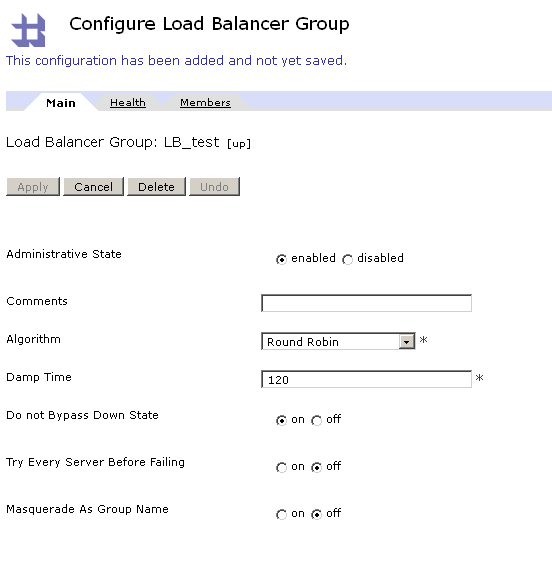
Conclusion
With only a few configuration steps we can create an intelligent load balancer. The load balancer actively executes health checks with SOAP-calls and maintains a list with the status of its members. When a connection error occurs during an actual call from a client it automatically retries to make a connection with one of the known healthy members. When no member is ‘Up’ the call will directly fail and therefore prevent an exponential rise of open connections in case of a high load.
Author: Tim
What we want to achieve in this setup is an intelligent load balancer that can do fail-over, but that excludes the members which are known to be in 'down' state from these fail-over tries.
In case none of the members is considered ‘up’, we want an immediate error-response and no extra waiting times for retries to backends that will probably fail. One of the reasons for such an approach might be that we want to isolate problems with a specific backend and make sure our Datapower appliance is not affected by a huge number of open connections (e.g. due to to a very high load and a relatively large time-out value). If the amount of open connections keeps on rising we will eventually reach the boundaries of the appliance and start receiving out-of-memory errors...
First of all a short explanation on the different states of a member of the load balancer group:
- ‘up’: this is the default state of a member of the load balancer when it is added, but this state can also be reached when a member that was ‘down’ succeeds a health check.
- ‘down’: this state can be reached when a health check on this member failed or when the member is manually disabled.
- ‘softdown’: aka dampened, when an actual request reaches a connection error, the state of the member that caused the error is set to ‘softdown’ for a period specified in the ‘damp time’.
Healthcheck
After adding the members to the load balancer group we are going to add a health check. The default health check sends an empty soap-request and validates the received response against the entered xpath. Since the default xpath is ‘/’ the health check will be valid if any xml-response is received.
One option needs some extra attention: the ‘Timeout’ value. This value represents the amount of seconds before the health check fails with a time out. However, since the health check request is done using a user agent object, in reality the time out of the user agent is the one that is used.
Main load balancer group settings
The options that need some extra clarification here are ‘Do Not Bypass Down State’ and ‘Try Every Server Before Failing’.- ‘Do Not Bypass Down State’: This property should ensure that when all members of the load-balancing group are down and a new request for that group is made, no attempt will be made to connect. However you should note that the load balancer is only behaving like this when this property is set to ‘On’ AND the property ‘Try Every Server Before Failing’ is set to off.
- ‘Try Every Server Before Failing’: As stated above, this property overrules the ‘Do Not Bypass Down State’ when it is set to ‘On’. The Datapower help-file will tell you the following:
This text is a bit confusing, since in reality we observed the following behavior: not only dampened and healthy members, but also unhealthy members are tried. This can cause some serious problems in case of time-out errors on multiple members, since each member adds this time-out to the total execution time... When this property is set to ‘Off’, the behavior observed is that in case of a failed connection attempt, the next member in state ‘Up’ is tried.
For the intelligent load balancer that we want to create we need to set the property ‘Do Not Bypass Down State’ to ‘On’ and the property ‘Try Every Server Before Failing’ to ‘Off’ as can be seen in the screenshot below.
Conclusion
With only a few configuration steps we can create an intelligent load balancer. The load balancer actively executes health checks with SOAP-calls and maintains a list with the status of its members. When a connection error occurs during an actual call from a client it automatically retries to make a connection with one of the known healthy members. When no member is ‘Up’ the call will directly fail and therefore prevent an exponential rise of open connections in case of a high load.
Author: Tim
Subscribe to:
Posts (Atom)